Description
Overview
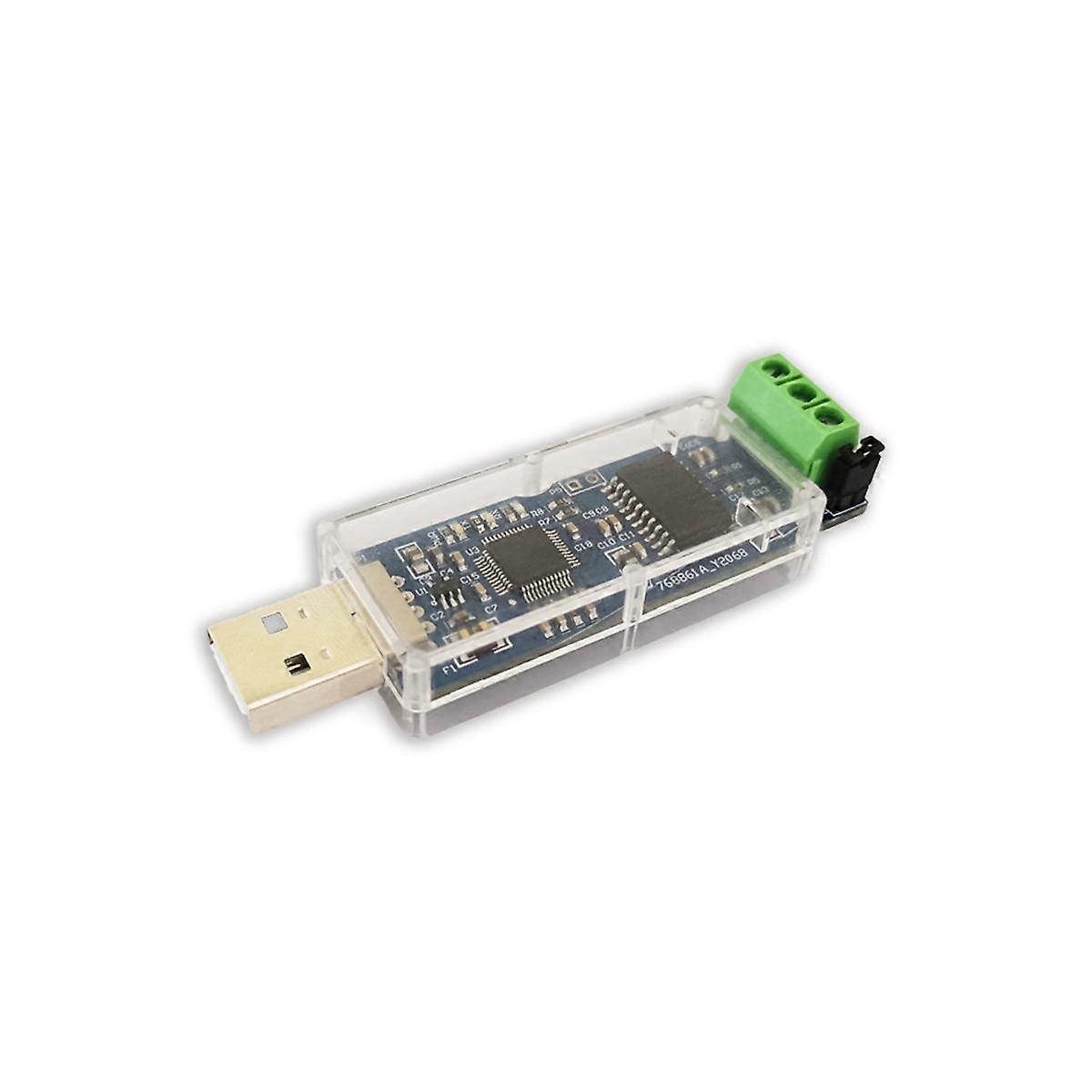
The CANable is a small low-cost open source USB to CAN adapter. The CANable enumerates as a virtual serial port on your computer and acts as a serial-line to CAN bus interface. With the alternative candleLight firmware, the CANable enumerates as a native CAN interface on Linux. CANable supports both standard CAN and CAN-FD.
CANable Features
- Supports CAN A and B, baud rates up to 1M
- Initial slcan support for CAN-FD (beta, 2M/5Mbaud)
- Compatible with socketcan through slcand
- USB-C Connector and breakaway mounting holes
- 4-pin screw terminal: CANH, CANL, 5v (output), GND
- Button for entering bootloader
- Switch to enable/disable onboard termination
- Simple cross-platform Python library
For more information on getting up and running with a CANable device, refer to the getting started page.
Software Support
The CANable is supported by several software applications:
- Cangaroo (Windows, Linux): Send/receive tandard and FD frames, decode messages from DBC files
- SocketCAN (Linux) Native Linux support using slcand
- python-can (Windows, Linux, Mac) Easily interface with the CAN bus using your CANable and Python scripts
- also you can use SavvyCAN
cabable can use two firmware slcan or candleight
Stock slcan firmware
CANables ship with slcan firmware. This firmware enumerates as a standard serial device on Linux, Mac, and Windows for easy interfacing. The CANable can be easily re-flashed with the candlelight firmware which enumerates as a native CAN device in Linux and a generic USB device in Windows.
On Linux the CANable works natively with slcand, so you can use all of the standard can-utils command-line utilities and even Wireshark to interact with the bus.
On Windows and Linux, the CANable works with Cangaroo which allows transmission/reception of standard and FD frames as well as decoding of messages from loaded DBC files.
candlelight Firmware
If you update to the candlelight firmware, the CANable shows up as a native CAN device with socketcan–no slcand required! Performance is higher than the serial-line firmware as slcand is bypassed entirely. With Linux and socketcan you can use all of the standard can-utils command-line utilities and even Wireshark to interact with the bus. Note: candlelight firmware for CANable 2.0 currently does not support FD frames
Python Support
For even more flexibility, the python-can library allows you to directly talk to the CAN bus from Python. The library is cross-platform and can connect directly to a CANable’s virtual serial port interface or native socketcan interface. With only a couple lines of code you can decode traffic on the bus, send messages, and more.
Check out the getting started page for more information.
slcan protocol -mangamotor
The SLCAN protocol (Serial Line CAN) is a simple ASCII-based protocol that allows communication between a CAN (Controller Area Network) bus and a host computer over a serial interface (like UART or USB virtual COM ports). It’s often used with USB-to-CAN adapters based on microcontrollers (like STM32, Arduino, or devices with CAN transceivers).
Key Points:
-
SLCAN = Serial Line CAN
-
Defined by Lawicel (originates from their CAN232 device)
-
Used to send and receive CAN frames over a serial link
-
Widely supported by tools like SocketCAN on Linux
SLCAN Frame Format (ASCII commands):
| Command | Description | Example |
|---|---|---|
t |
Send standard CAN frame (11-bit) | t1232ABC\r |
T |
Send extended CAN frame (29-bit) | T1234567811AABBCC\r |
r |
Send remote standard frame | r1232\r |
R |
Send remote extended frame | R1234567800\r |
O |
Open CAN channel | O\r |
C |
Close CAN channel | C\r |
V |
Get version info | V\r |
F |
Read status flags | F\r |
Example:
To send a standard CAN frame with ID 0x123, 2 bytes of data (0xAB, 0xCD), you send:
Usage:
-
Commonly used in embedded systems and tools like:
-
CANtact, CANable
-
STM32-based CAN adapters
-
Linux
slcandriver withslcandto interface with SocketCAN
-
matlab example
To send a CAN message to read the RPM from a car using a CANable device and MATLAB over serial, you typically need to send a diagnostic request using OBD-II PID over CAN (ISO 15765-4).
🚗 Step-by-Step: Read Car RPM via CAN
🧠 Background
-
OBD-II uses the service 01 (Show current data).
-
Engine RPM is PID 0C.
-
Standard OBD-II request over CAN (11-bit ID):
-
CAN ID:
0x7DF(Functional request) -
Data (8 bytes):
02 01 0C 00 00 00 00 00-
02: Number of following bytes (2 bytes: 01 0C) -
01: Service ID (Current Data) -
0C: PID (Engine RPM) -
Rest: Padding with zeros
-
-
🧪 MATLAB Code to Send RPM Request
🔍 What to Look for in the Response
You’re expecting a response from ID 0x7E8 (ECU reply):
Example response:
-
41 0C= Response to01 0C -
1A F8= Data bytes -
RPM = ((A * 256) + B) / 4 = ((0x1A * 256) + 0xF8)/4 = 1726 RPM
🛠️ Parsing the RPM Response
You can extract and compute the RPM like this:
Explanation of Message
SLCAN format for standard (11-bit) CAN frame:
-
t= standard frame -
IID= 3-digit hex identifier (e.g.,123) -
D= data length code (0–8) -
CCCCCCCC= data bytes in hex (2 hex chars each) -
\r= carriage return
For extended (29-bit) frames, use T instead of t and 8-digit hex ID.

Reviews
There are no reviews yet.